
Squarespace vs WordPress vs GoDaddy: Which Website Builder is Best?
A simple guide to choosing the right platform for your website.
If you're looking to create a website for your business, you'll quickly discover there are a lot of platforms to choose from.
Squarespace, WordPress and GoDaddy are three well-known options, but they work quite differently. You'll also come across free website builders, DIY platforms, hosted solutions and self-hosted websites — which can make choosing the right one feel more complicated than it needs to be.
The truth is, there isn't one website builder that's right for every business.
The right choice depends on what you need your website to do, how much control you want, how comfortable you are managing the technology and how much time you want to spend maintaining it.
So, rather than telling you which platform you should choose, here's a straightforward look at Squarespace vs WordPress vs GoDaddy, including the pros and cons of each.
At a Glance
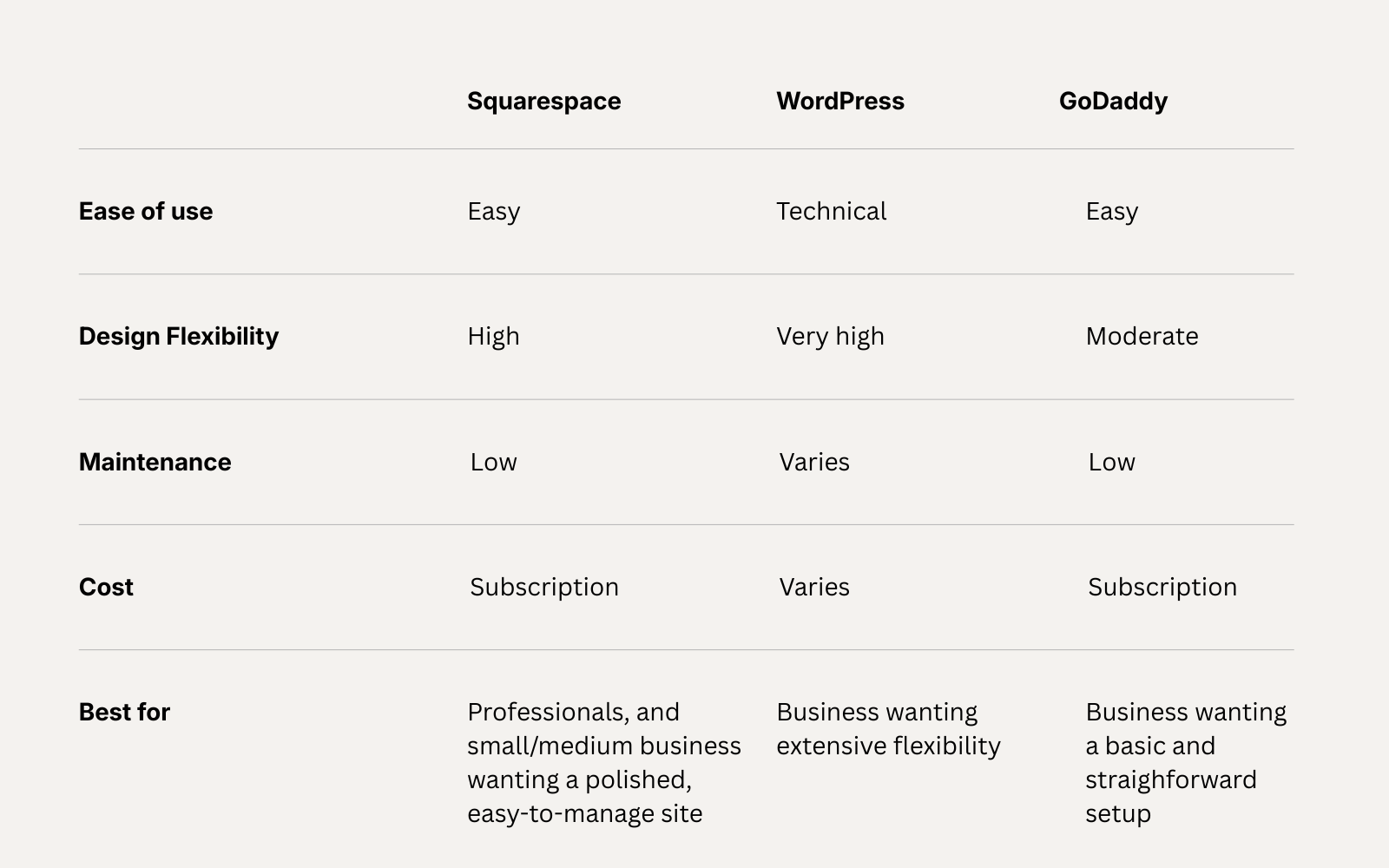
Features and plans vary between providers and can change over time.
Squarespace
Squarespace is the platform we use at Siya Studio and there are good reasons why it works well for the types of businesses we design websites for.
Squarespace is a hosted website platform, which means your website, hosting, security and core platform are managed within the same ecosystem.
It also puts a strong emphasis on design, with professionally designed templates and a visual editor that makes it possible to customise your website without needing to code. Squarespace currently offers a 14-day free trial rather than a permanent free plan.
The pros
Professional design
Squarespace has a strong design focus, making it a good option if how your business looks online is important to you.
Easy to manage
Once your website is built, you can update your own text, images, pages and other content without needing to rely on a developer for everyday changes.
Hosting is included
You don't need to find separate hosting or manage server updates and security yourself.
Built-in SEO tools
Squarespace provides built-in SEO tools and technical features to give your website a solid foundation for search.
Mobile-ready
Squarespace websites are designed to work across desktop and mobile devices, with tools that allow layouts to be adjusted for different screen sizes.
Room to grow
You can start with a straightforward service-based website and add features such as ecommerce, marketing tools and other integrations as your business develops.
The cons
No permanent free plan
Squarespace offers a free trial, but you'll need a paid plan to publish your website.
Less technical control than WordPress
If you need highly specialised functionality or extensive technical customisation, WordPress may give you more flexibility.
Ongoing subscription
Like other hosted website builders, you'll have an annual platform cost to keep your website online.
Squarespace could suit you if...
You want a professional, well-designed website that's easy to manage, without wanting to deal with hosting, plugins, security updates or technical maintenance yourself.
WordPress
WordPress is a little different because there are actually two things people can mean when they say "WordPress".
WordPress.com is a hosted platform with a free plan and paid options.
WordPress.org is open-source software that you install on your own hosting. With this version, you have much more control, but you're also responsible for things such as hosting, security, backups and updates — unless you pay someone else to manage them.
That distinction is important when comparing WordPress with Squarespace and GoDaddy.
The pros
Extremely flexible
WordPress has a huge ecosystem of themes and plugins, making it possible to create websites with highly specific functionality.
Extensive customisation
If you need something very specific, WordPress can offer a level of control that many hosted website builders don't.
Powerful publishing platform
WordPress has long been popular with businesses and publishers that produce a lot of content.
Large ecosystem
There are thousands of themes, plugins, developers and specialist services available.
The cons
More to manage
With self-hosted WordPress, you're responsible for your hosting and technical environment. Updates, security, backups and plugins all need to be managed properly.
Plugins can add complexity
Plugins can be incredibly useful, but they also introduce another layer of software to maintain and keep compatible.
Costs can vary
WordPress software itself can be free, but a professional WordPress website may involve hosting, premium themes, plugins, development and ongoing maintenance.
WordPress could suit you if...
You need significant flexibility, custom functionality or a content-heavy website, and you're comfortable managing the technical side — or have a developer who can manage it for you.
GoDaddy
GoDaddy takes a different approach again.
Its Website Builder is designed to help you get a website online quickly, with templates, editing tools, built-in marketing features and AI-assisted website creation. GoDaddy currently offers a free website option, with additional features available on paid plans.
The pros
Quick to get started
GoDaddy is designed for people who want to get a website online without a complicated setup.
Beginner-friendly
The editing tools are designed for people without technical or web design experience.
Free option available
You can start with a free website and upgrade when you need additional features.
Marketing tools
GoDaddy includes a range of marketing features within its website platform.
Hosting and support included
You don't need to manage separate hosting, and GoDaddy provides customer support.
The cons
Less design flexibility
If highly customised design is important to you, you may find the platform more limiting than Squarespace or WordPress.
Can feel more DIY
The simplicity that makes GoDaddy easy to use can also mean less control over the finer details of your website.
Free comes with limitations
As with most free website builders, you'll need to upgrade to access additional features and create a more fully featured business website.
GoDaddy could suit you if...
You want to get a simple website online quickly, particularly if you're comfortable doing the design and content yourself.
What about free website builders?
This is often where the comparison starts.
A free website builder can be a useful way to experiment, learn how websites work or create a very simple online presence.
But it's worth looking beyond the word free.
Free plans can come with limitations such as:
A platform-branded domain
Platform advertising
Fewer design options
Limited storage or features
Restricted ecommerce or marketing tools
Less control over your website
For example, WordPress.com's free plan uses a WordPress.com subdomain and displays advertising to visitors, while GoDaddy offers a free website that can be upgraded for additional business features. Squarespace doesn't currently offer a permanent free plan, but does provide a 14-day trial.
If your website is going to represent an established business and generate enquiries, bookings or sales, it's worth considering the overall value and functionality rather than simply choosing the cheapest option.
So which website builder should you choose?
There's no universal answer.
Squarespace
Consider Squarespace if you want:
Professional design
Easy day-to-day management
Built-in hosting and security
Strong SEO foundations
A polished website without a complicated technical setup
A one-stop shop — Your website, analytics, SEO and marketing tools are all accessible from one easy-to-use dashboard, making it simpler to manage your online presence
WordPress
Consider WordPress if you need:
Extensive customisation
Advanced functionality
A large publishing platform
Access to a huge plugin ecosystem
Greater technical control
GoDaddy
Consider GoDaddy if you want:
A quick DIY setup
Simple editing
A free starting option
Built-in marketing tools
A straightforward way to get online
The best platform is ultimately the one that fits the way your business works and what you need your website to achieve.
And where does professional website design fit in?
Choosing your platform is only one part of creating a successful website.
A website can be built on a great platform and still fail to communicate clearly, guide visitors or turn traffic into enquiries.
That's where professional website design comes in.
Your content, structure, imagery, navigation, calls to action, mobile experience, SEO and overall customer journey all matter.
At Siya Studio, we use Squarespace because it gives us the combination of design flexibility, ease of management and built-in functionality that suits the businesses we work with.
We build your website from the ground up, shaping the design, structure and content around your brand, your customers and the way your business works.
The result is a website that doesn't just look good — it has a clear purpose and gives your business a strong digital foundation.
Still deciding?
If you're not sure which platform is right for your business, start by thinking about what you actually need your website to do.
Simple and professional? Highly customised? Content-heavy? Quick and DIY?
Once you know that, choosing your platform becomes much easier.
And if Squarespace sounds like the right fit, discover our approach to website design at Siya Studio.
